아이튠즈 설치 하지 않고 AAC , ALAC (애플 무손실) 코덱으로 인코딩 하기
두번째 방법 추천
준비물
1. 64비트 윈도우가 설치된 컴퓨터 & MusicBee 설치
2. 아이튠즈 64비트 최신버전 (작성일 기준 ver12.11.4.15) https://www.apple.com/itunes/download/win64
3. makeportable2.cmd https://raw.githubusercontent.com/nu774/makeportable/master/makeportable2.cmd
4. qaac 2.72 https://github.com/nu774/qaac/releases
다운로드 받은 iTunes64Setup.exe 와 makeportable2.cmd 파일을 같은 폴더에 넣는다
makeportable2.cmd파일을 실행한다
명령프롬프트상에서 작업이 진행되고 다 끝나면 알아서 창이 닫힐때까지 기다린다
QTfiles64라는 폴더가 생성된 것을 확인할 수 있다
(cmd창이 안열리거나 잠깐 떴다가 사라지는 경우에는 7zip실행파일과 같은 폴더에 놓고 다시 해본다)
편의상 QTfiles64를 폴더째 복사해서 MusicBee의 Codec 폴더안으로 이동시킨다 (필수아님)
qaac_2.72.zip 파일 안에 x64폴더속 파일3개를 압축해제한다
qaac64.exe , libsoxr64.dll , libsoxconvolver64.dll 을 MusicBee의 Codec 폴더 안으로 이동시킨다
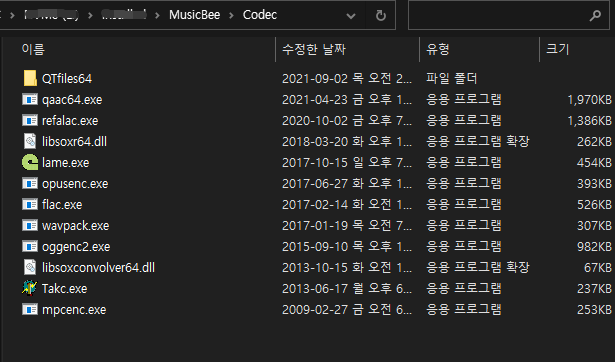
★추천★
준비물
1. 방법1과 동일
2. QTFiles64 https://github.com/AnimMouse/QTFiles/releases
3. qaac 2.72 https://github.com/nu774/qaac/releases
QTFiles64 링크에 들어가서 QTFiles64.7z (3.83MB) 을 다운받아서 압축해제
qaac 2.72 안에 x64폴더안의 파일3개를 압축해제해서 위 폴더안에 같이 넣어준다

준비가 끝났다
뮤직비 설정에 들어간다 (foobar2000도 같은 방법으로 설정 가능)
파일-편집-환경설정-파일변환

AAC 인코더 사용에 체크
인코더 위치는 ... 을 눌러서 위에서 준비한 qaac64.exe 파일 선택
인코딩 매개변수 를 보면 작은파일크기, 표준품질, 고품질, 최대품질 4가지 써있는데 다 지우고
--ignorelength --no-smart-padding -v 256 -q 2 -o [outputfile] -
고품질에다가 이거만 적어준다 (매개변수에 대한 도움말)
아래쪽으로 이동해서 ALAC 인코더 사용에 체크
인코더 위치는 ... 을 눌러서 qaac64.exe 선택

다음을 이용하여 파일 크기 줄이기 체크해제
최대압축 표준압축 둘다 기본값 지우고
--alac --ignorelength -o [outputfile] -
적어준다
아래쪽에 설정 저장을 누른다
원하는 파일에 우클릭-보내기-파일형식변환도구 선택하면
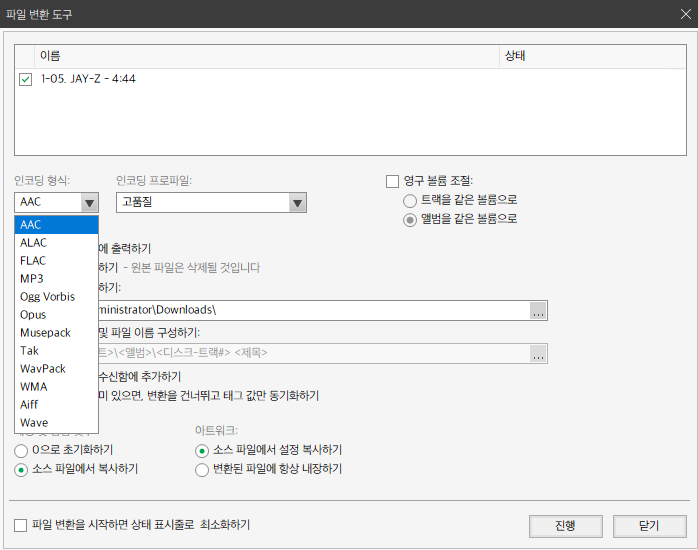
AAC로 변환 잘된다
-i, --ignorelength : Assume WAV input and ignore the data chunk length.
--no-smart-padding : Don't apply smart padding for gapless playback. By default, beginning and ending of input is extrapolated to achieve smooth transition between songs. This option also works as a workaround for bug of CoreAudio HE-AAC encoder that stops encoding 1 frame too early. Setting this option can lead to gapless playback issue especially on HE-AAC. However, resulting bitstream will be identical with iTunes only when this option is set.
-v, --cvbr : AAC Constrained VBR mode / bitrate
-q, --quality : AAC encoding Quality [0-2]
-o : Specify output filename
'도움' 카테고리의 다른 글
| idm 다운로드 오류 메세지 (0) | 2021.10.18 |
|---|---|
| 윈도우 11 호환성 검사 (0) | 2021.10.06 |
| 원노트 업데이트 오류 OneNote for Windows 10 (0) | 2021.08.18 |
| R-Studio 파일 복구 프로그램 사용 (0) | 2021.08.07 |
| EaseUS Todo Backup 13.0 사용법 (0) | 2021.08.05 |